Google Maps “Immersive View”: Why Standard Navigation is Dead
If you have been driving with your phone mounted to your dashboard over the last decade, you know the drill. You type in an address, stare at a flat blue line, and wait for a robotic voice to tell you to turn in exactly 800 feet. You then inevitably miss the turn because you have absolutely no idea what 800 feet actually looks like in the real world.
Fortunately, as of May 2026, the era of guessing where your exit is has officially ended. Google Maps has aggressively rolled out its “Immersive Navigation” and “Immersive View for routes,” fundamentally shifting how we get from point A to point B.
If you haven’t opened your Maps app lately, standard navigation is dead. Your phone screen can now show you exactly what your turn looks like in real-time, photorealistic 3D. Here is a factual, hype-free breakdown of how this new mapping technology actually works, and why you will never want to look at a flat map again.
The Magic Behind the 3D World
To understand why this is such a massive leap, we have to look at the technology powering it. Google is utilizing Neural Radiance Fields (NeRFs) and their Gemini AI models to do something that sounds impossible: they are stitching together billions of flat Street View photos and high-resolution aerial satellite images to create a playable 3D video game level of the real world.
Instead of a blue line on a grey grid, your phone now generates a live, 3D model of your car driving down the actual street. You see the physical buildings, the exact number of lanes, overpasses, and even accurate weather simulations. If it is raining outside, it is raining on your map. If it is rush hour, the map simulates the actual traffic density around you.
“You are no longer looking at a map; you are essentially looking at a digital twin of the city from a helicopter flying just behind your car.”
3 Features That Kill the “Blue Line”
The visual upgrade is stunning, but the real reason traditional navigation is obsolete comes down to three massive practical features:
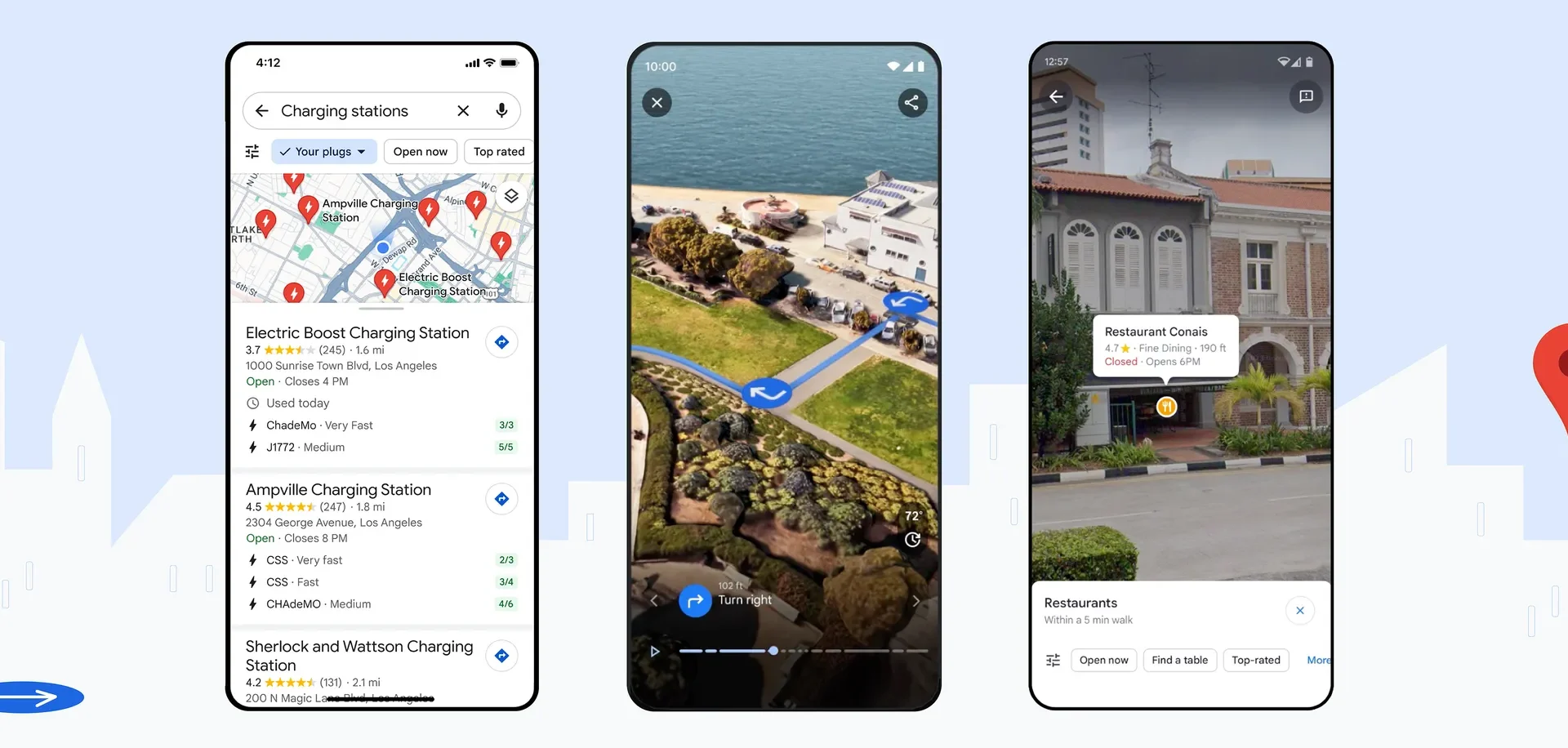
- Smart Zoom for Highway Exits: We have all panicked at a complex highway interchange with three overlapping ramps. With Immersive Navigation, the map performs a “smart zoom” as you approach complex junctions. It literally makes the buildings and overpasses that block your view transparent, showing you exactly which lane you need to be in long before you get there.
- Conversational Voice Guidance: The robotic “In 500 meters, turn right” is gone. Google rewrote the voice system to sound like a human sitting in your passenger seat. The app now gives contextual, visual cues, saying things like, “Go past this exit and take the next one at the yellow sign.” It gives you immediate visual references instead of forcing you to estimate distances while driving at highway speeds.
- The Street View Arrival: Driving to a new restaurant in a crowded downtown area is a nightmare. The map usually just says “You have arrived” while you are sitting at a red light wondering where the actual front door is. Now, as you approach your destination, the map automatically launches a Street View preview, highlighting the exact pedestrian entrance, showing you which side of the street to pull over on, and highlighting nearby parking garages.
The Navigation Evolution: A Quick Comparison
To summarize just how much has changed, here is a quick look at how the old navigation compares to the new 2026 Immersive standard:
| Feature | The Old Standard Navigation | The New Immersive Navigation |
| Visual Style | Flat 2D vector graphics and a blue line | Photorealistic 3D environments |
| Lane Guidance | Tiny arrows at the top of the screen | Highly visible 3D paths painted on the actual road |
| Voice Directions | Distance-based (“In 1,000 feet”) | Landmark-based (“After the gas station”) |
| Weather & Time | Standard light mode or dark mode | Dynamic weather and accurate sun positioning |
The Reality of Running It on Your Phone
Before you completely abandon traditional maps, there is a practical reality we need to discuss: rendering a real-time 3D world on your dashboard takes power.
Google streams the heavy 3D rendering directly from their servers based on your GPS position, which means your phone isn’t doing all the processing work. However, keeping your screen on, utilizing continuous GPS, and downloading heavy 3D assets over a cellular network will drain your battery noticeably faster than a standard 2D map.
If you are just driving five minutes down the road to a grocery store, the classic 2D map is probably still your best bet for battery preservation. But if you are navigating the confusing, multi-level streets of a new city, or trying to find a specific parking garage in the pouring rain, plug your phone into a charger and turn Immersive View on.
The Bottom Line
Standard navigation taught us to stare at a screen and translate abstract shapes into real-world actions. Immersive Navigation finally bridges that gap. By showing us the world exactly as it appears through our windshield, it takes the stress out of driving. Make sure your app is updated, set a route to somewhere new, and enjoy the view.